Blog / Article
Items the way the game shows them, a page for every skill and a sharper trade search
Every item on D2RHub now looks like its in-game tooltip, built from the game's own files. Plus compact unique, set and runeword lists, a page for every class skill, and trade filters that find the right stats.
Here's what's new on D2RHub since last week.
Items, the way the game shows them
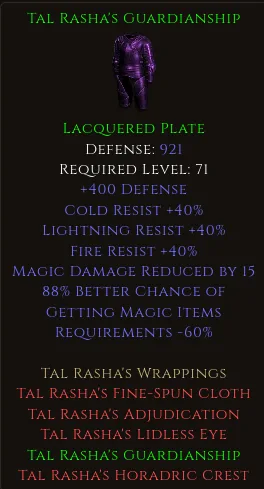
Every item on D2RHub is now drawn as its in-game tooltip: the same wording, the same order and the same colors as in Diablo II: Resurrected. We build the tooltips from the game's own data and text files, and checked them line by line against screenshots from the game.
- Ranges like the Chronicle. Where a stat rolls, you see its whole range in light blue, the way the game's Chronicle shows it: (8-10)% Life stolen per hit on Andariel's Visage, or +(1-148) to Life (Based on Character Level) on Harlequin Crest.
- Runewords with their runes. A runeword's tooltip includes what its runes add in that kind of item, so Enigma shows the 8% damage reduction its Ber gives in armor. A runeword that fits several kinds of item gets one tooltip per kind: Spirit in a sword and in a shield.
- Set items with the whole set. A set item's page shows it as if you wore the full set, with each bonus and how many pieces it needs. A bonus the game gives again at each piece count shows once as its total: every Aldur's Watchtower piece adds +15 to an attribute at 2, 3 and 4 pieces, so +45 with the full set.
- Hover any item name in a build, on a monster page, in the Drop Calculator or in a forum post to see its tooltip.
- Listings too. Items for trade show their actual rolls the same way. A lone set piece looks like it does in your inventory, with the other pieces of its set in red.
Unique, set and runeword lists at a glance
The unique, set and runeword lists are now compact indexes: uniques by item type and tier, sets with their pieces, runewords by the item they go in and its sockets. Hover a name for its tooltip, or click it for its page. The search finds stats too: type cast rate and you get every item with Faster Cast Rate, with the matching line under its name.
A page for every skill
All 240 class skills, the Warlock's included, now have a page of their own with their requirements, synergies and numbers at every level from 1 to 20. Open one from the arrow on any skill card, like Blizzard.
Trading
- Filters above the listings. The filters moved from the sidebar to a bar above the listings. Stats, base type, unidentified, item properties, sockets and seller rating are always there, and the price search opens under Search by price.
- A stat search that suggests. Start typing a stat, by name or shorthand like fcr or mf, and pick it from the list. A stat with no minimum now finds every item that has it, and a min or max narrows it down.
- Several of the same item. One listing can hold several identical items with a price per item, and the card shows how many are left.
- Tidier cards. Price alternatives sit in equal boxes under "Any one of", centered under the item.
- Screenshot reading fills in the item's category for you.
Easier to share
- Shorter build addresses, like /builds/blizzard-mf. Old links still work.
- Links to items and builds on Discord, Reddit and X get a preview card with the item's name and stats, or the build's video still.
- Every wiki page says which patch its numbers come from and when they last changed.
Who's behind D2RHub
The new About page tells you who runs the site, where its data comes from and how it stays up to date.
Found a bug or have an idea? Tell us on Discord.
Discussion
0 repliesNo replies yet — start the discussion.
Join the discussion