Blog / Article
Search anything on D2RHub
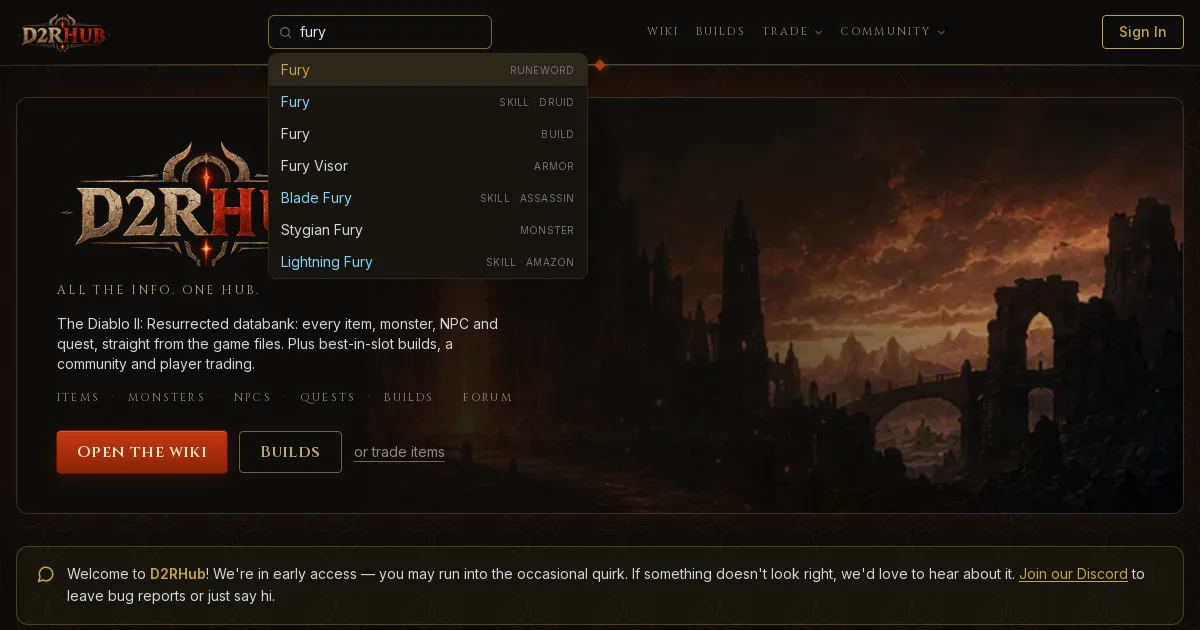
The search box now finds items, monsters, NPCs, quests, skills, builds, wiki pages and players, as you type.
The search box at the top of every page used to find players and nothing else. It now searches the whole site: type a few letters and jump straight to what you're looking for.
What you can search for
- Items: every unique, set item, runeword, base, rune, gem and charm. Type "harle" and Harlequin Crest is right there.
- Monsters: every monster, boss and super unique, from the Fallen to Pindleskin and the Council.
- NPCs and companions: town NPCs, mercenaries and summons.
- Quests: all 27, with the act they're in.
- Skills: all skills of every class, the Warlock included, linked to the skill on our skills page.
- Builds: every best-in-slot build, with MrLlamaSC's guide.
- Wiki pages and tools: cube recipes, affixes, items worth keeping, the skill planner and more.
- Players: by name, as before.
How it works
Results show up as you type, with a label saying what each one is, so "Fury" shows you the runeword, the Druid skill and the build side by side. Use the arrow keys and Enter to pick one without touching the mouse.
The search runs in your browser on a small index of the site, so results are instant.
What's next
This is the first step toward asking D2RHub anything about the game. Missing something you expected to find? Let us know in #bug-reports on our Discord or on the forum.
Discussion
0 repliesNo replies yet — start the discussion.
Join the discussion